Is AI actually sending you traffic? How to check in GA4
GA4 now has an AI Assistant channel, but it misses some AI visits. Where ChatGPT, Perplexity and Claude traffic lands, and how to count all of it.
 Achour Khattallah
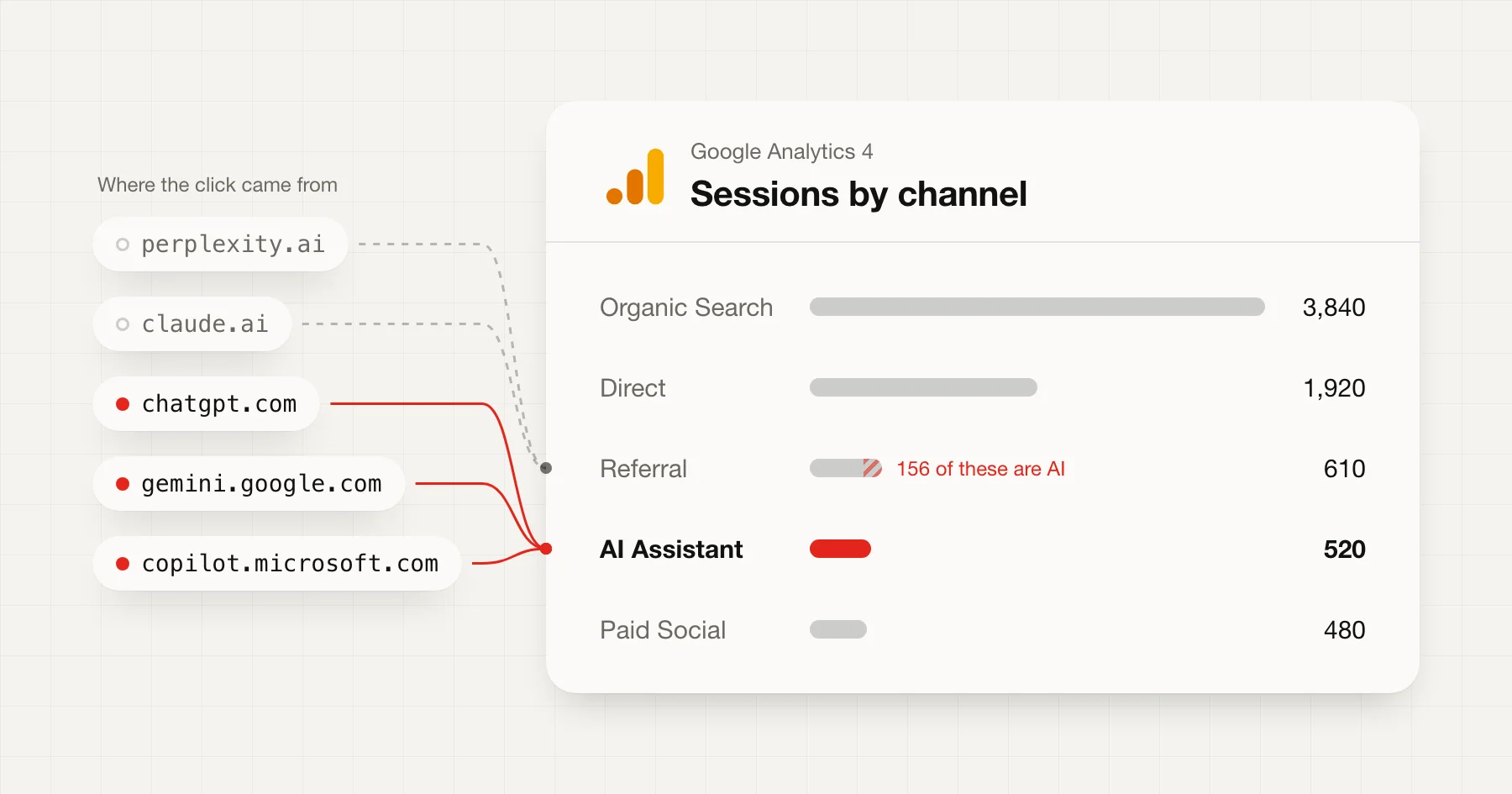
Probably, and GA4 now shows some of it for you. Since May 2026 it has an AI Assistant channel that collects visits from ChatGPT, Gemini, Copilot and a few others, with no setup.
But that channel isn't the whole answer. Some AI assistants aren't on Google's list, Google's own AI answers count as search, and some AI clicks arrive with no trace at all. This post shows where each kind of AI visit ends up, how to check yours in five minutes, and one rule that counts the ones GA4 misses.
- GA4 added the AI Assistant channel
- May 13, 2026
- assistants Google names as examples
- 5
- places an AI visit can land
- 4
- custom rule to count them all
- 1
What GA4's AI Assistant channel counts
On May 13, 2026, Google added a new channel to GA4's default reports. When a visit's referrer matches Google's list of AI assistants, GA4 does three things:
- sets the medium to
ai-assistant - sets the campaign to
(ai-assistant) - files the session under the AI Assistant channel
Google's channel definitions give ChatGPT, Gemini, Deepseek, Copilot and Grok as examples. The wording is "sources like", so the list may be longer, but those five are the only ones Google names.
There's nothing to switch on. If you have GA4, the channel is already in your reports. What Google doesn't say is whether visits from before May 13 were moved into it. Assume they weren't, and don't compare this year with last year using this channel alone.
Where the rest of your AI visits land
An AI visit can end up in four different places in GA4, depending on where the click came from and what the browser passed along.
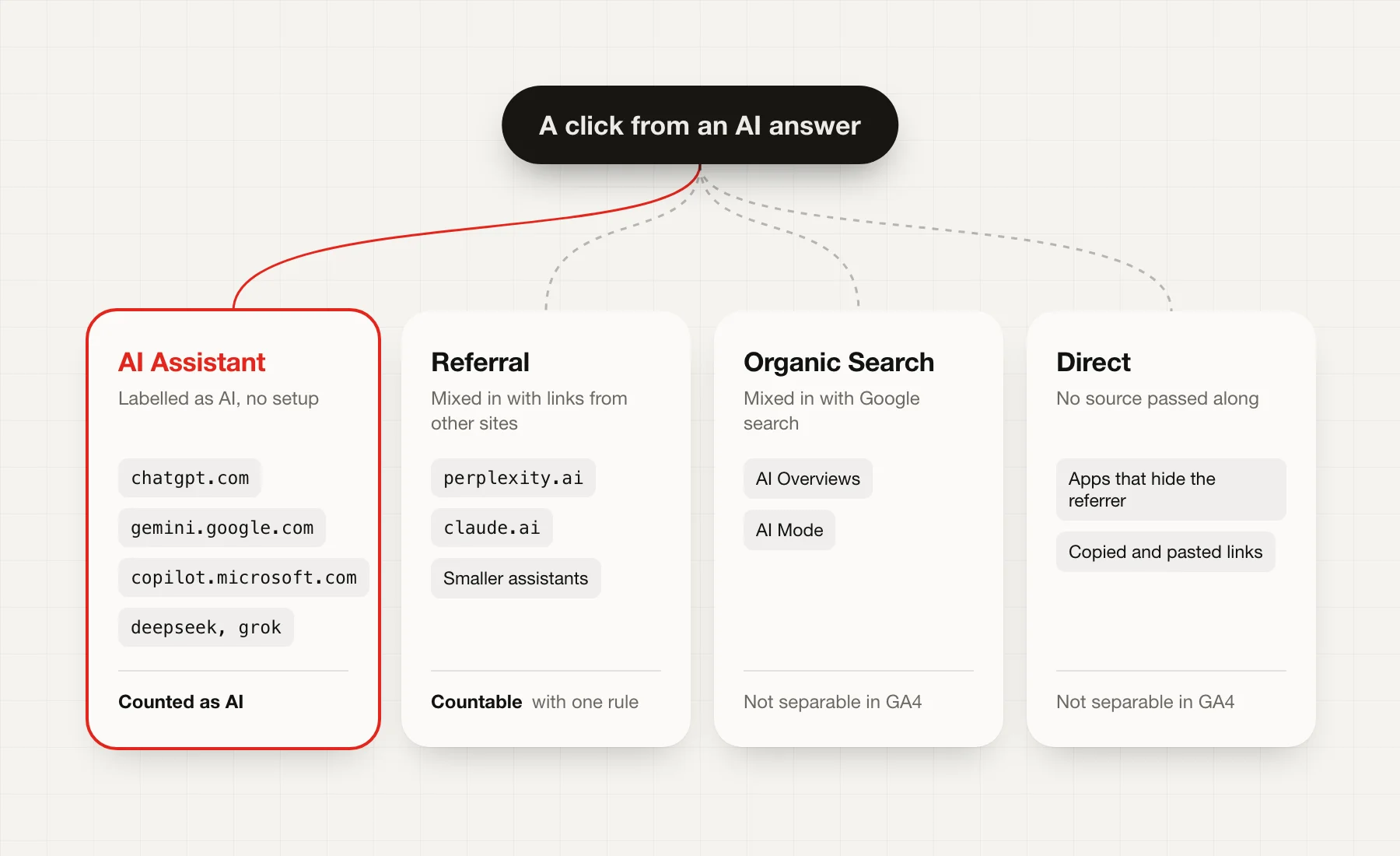
- AI Assistant. The assistants on Google's list, when the referrer comes through.
- Referral. Assistants Google doesn't name. Perplexity (
perplexity.ai) and Claude (claude.ai) aren't among the examples, so expect them here, next to links from blogs and news sites. Several analytics blogs report the same, but check your own reports, because Google can add to its list at any time. - Organic Search. Google says outright that its AI Overviews and AI Mode are not AI Assistant traffic. Those clicks arrive from
google.comand count as ordinary search, so GA4 can't separate them. - Direct. When an app or browser hides where a click came from, GA4 has nothing to go on and files the visit as Direct. Analytics blogs report this often happens with clicks from AI apps on phones. It also happens when someone copies a link out of an answer and pastes it.
The first two you can count. The last two you can't, at least not in GA4. Keep that in mind when you read the number: whatever GA4 shows is the least AI is sending you, not the total.
Check your own numbers in five minutes
You don't need to change any settings for this.
- In GA4, open Reports, then Acquisition, then Traffic acquisition.
- Set the date range to the last 90 days, or to after May 13, 2026 if you want the new channel's full history.
- Look for AI Assistant in the channel list. That's the part GA4 recognises.
- Change the table's first column to Session source / medium, using the dropdown in that column's heading.
- Type
aiinto the table's search box, then tryperplexityandclaude. This finds the AI visits sitting in Referral.
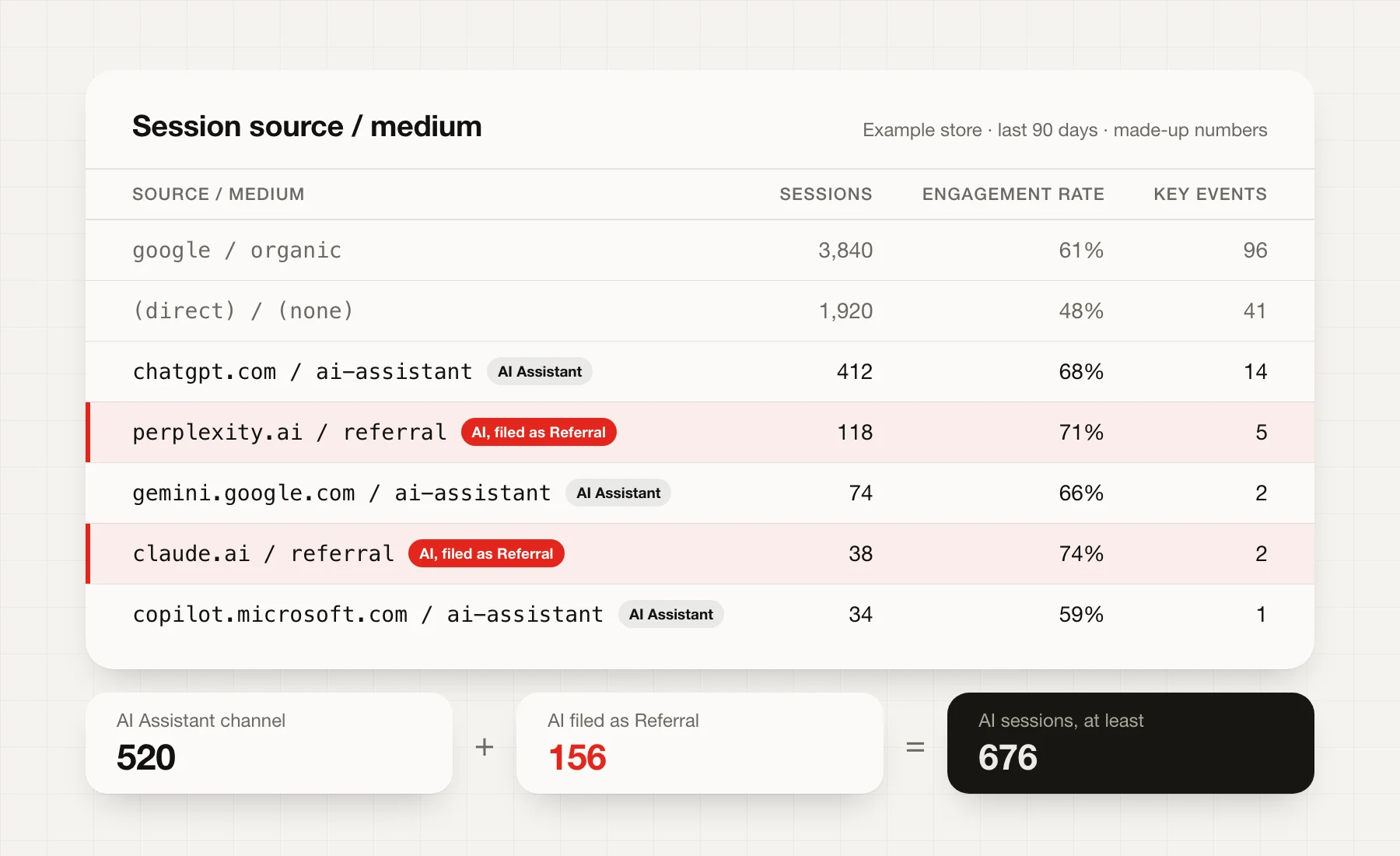
Add the rows up and you have a fair floor for your AI traffic. In the made-up store above, GA4's AI Assistant channel shows 520 sessions, but the true count is at least 676 once the Perplexity and Claude visits are added. That's 30% more than the channel shows.
You may also spot chatgpt.com as a source with a different medium, or utm_source=chatgpt.com in your landing page addresses. ChatGPT adds that tag to some of its links. How often it does so has changed over time, according to reports from analytics vendors, and OpenAI hasn't documented it, so treat it as a bonus rather than something to rely on.
Catch what it misses with a custom channel group
Checking by hand works once. To see all your AI traffic as one line every week, make a custom channel group. It's a copy of GA4's default channels with one channel you control, and Google says it applies to old data too, which the built-in channel may not.
- Go to Admin, then under Data display open Channel groups. You need Editor access.
- Click Create new channel group and name it something like "Channels with AI".
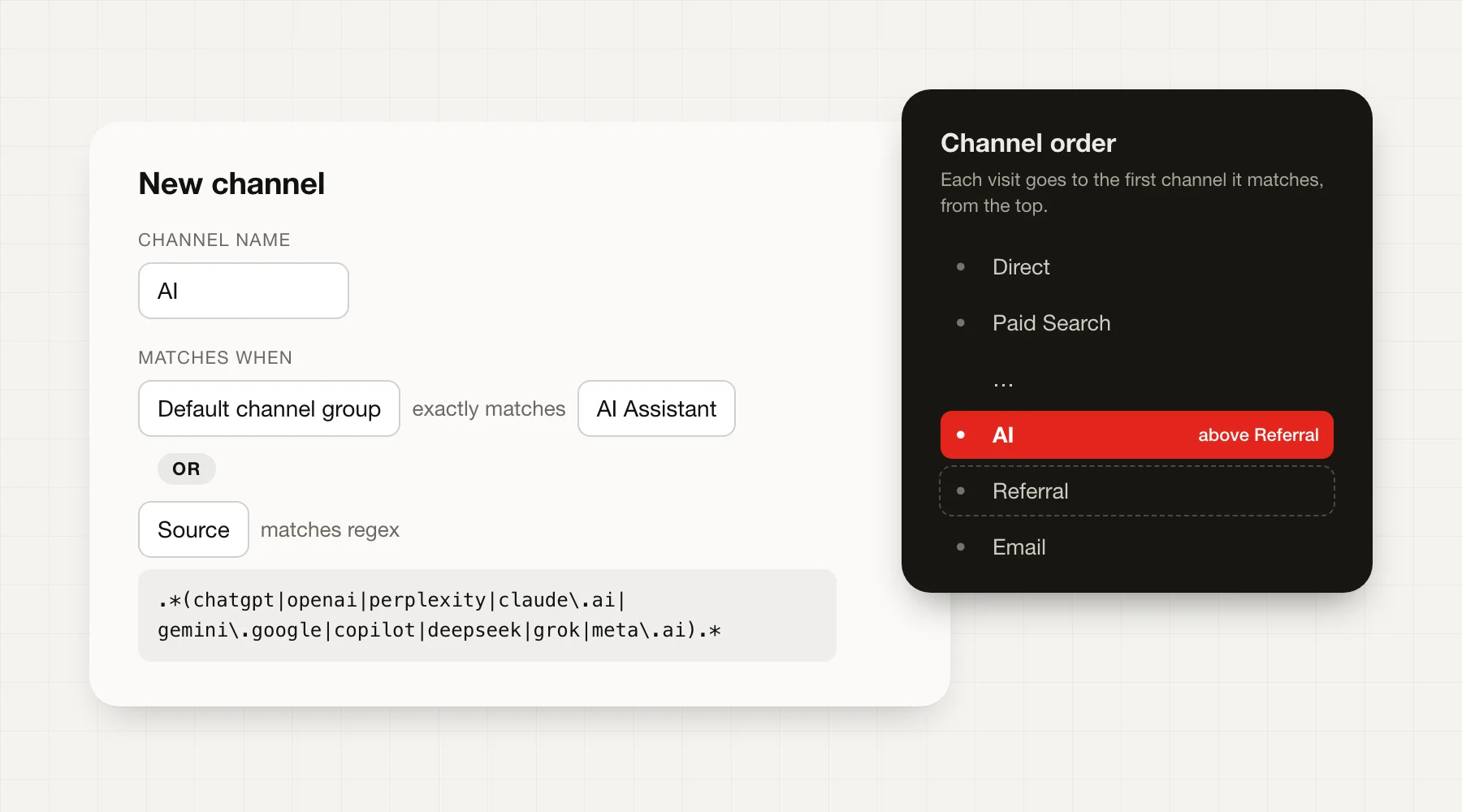
- Click Add new channel and call it "AI".
- Add a condition: Default channel group exactly matches
AI Assistant. This keeps everything Google already recognises. - Add a second condition joined with OR: Source matches regex, and paste this:
.*(chatgpt|openai|perplexity|claude\.ai|gemini\.google|copilot|deepseek|grok|meta\.ai).*
- Save the channel, then drag it above Referral. GA4 puts each visit in the first channel it matches, top to bottom. If Referral comes first, your Perplexity visits stay there.
- Save the group. In the Traffic acquisition report, switch the first column to your new group to use it.
A standard GA4 property can have two custom channel groups, so this uses one of them.
Is AI traffic any good?
Counting visits is the easy part. The question that matters for a store is whether those visitors do anything.
With your new channel in the Traffic acquisition report, compare the AI row with Organic Search and Referral on three columns:
- Engagement rate. The share of sessions that lasted more than 10 seconds, saw two or more pages, or triggered a key event. A low rate means people arrive, look and leave.
- Key events. Add to cart, checkout or purchase, whichever you've marked as key events.
- Landing page. Change the first column to Landing page and filter to the AI channel. You'll see which pages AI assistants recommend, and sometimes they aren't the ones you'd pick.
- AI68%
- Organic Search61%
- Referral54%
- Paid Social39%
Invented numbers to show the comparison. Your own will differ, and with a few hundred sessions a small change can swing the rate a lot.
Don't judge AI traffic on a handful of sessions. If the AI row has fewer than a hundred sessions a month, watch the trend over a quarter before you change anything because of it.
What GA4 can't show you
GA4 only sees clicks. A lot of what AI does for a store happens before anyone clicks:
- Mentions without links. An assistant can recommend your shop by name, and the person searches for you later. That visit shows up as Organic Search or Direct.
- AI Overviews and AI Mode. As above, Google counts these as search, so they're mixed in with your normal Google traffic.
- Agents that shop for people. An agent that compares products on someone's behalf may never load your analytics at all. My post on what to let AI agents do covers why that's starting to matter.
So use the GA4 number as a floor and a trend line, not a verdict. A simple check fills some of the gap: ask an AI assistant for what you sell, with real constraints like "linen shirt under $60, delivered by Friday", once a month. Note whether you're mentioned and what it says about you.